














Module 2: Seed Phrase: The Golden Rule of Crypto Security
What Is a Seed Phrase and Why It's More Important Than Your Wallet
Imagine that all your cryptocurrency isn't stored in an app on your phone or on a hardware device, but in 12 or 24 simple English words. Sounds strange? But that's exactly how blockchain cryptography works.
A seed phrase, also called a mnemonic phrase, recovery phrase, or backup phrase, is the master key to all your crypto assets. It's not just a password. It's a mathematically encoded representation of your private keys that can be written in human language.
Critical to understand: A wallet is just an interface for interacting with the blockchain. Real access to your funds comes from the seed phrase. Lose your phone with Trust Wallet — no problem. Lose your seed phrase — lose everything forever.
According to Chainalysis research, approximately 20% of all Bitcoin (roughly 3.7 million BTC worth over $140 billion) is lost forever due to lost access — mainly from lost seed phrases and private keys.
How Seed Phrases Work: Cryptography in Plain English
To understand the importance of a seed phrase, you need to grasp the basic principles of blockchain cryptography. Don't worry — we'll explain it as simply as possible, without complex mathematical formulas.
The Path from Seed Phrase to Your Money
Step 1: Entropy Generation (Randomness)
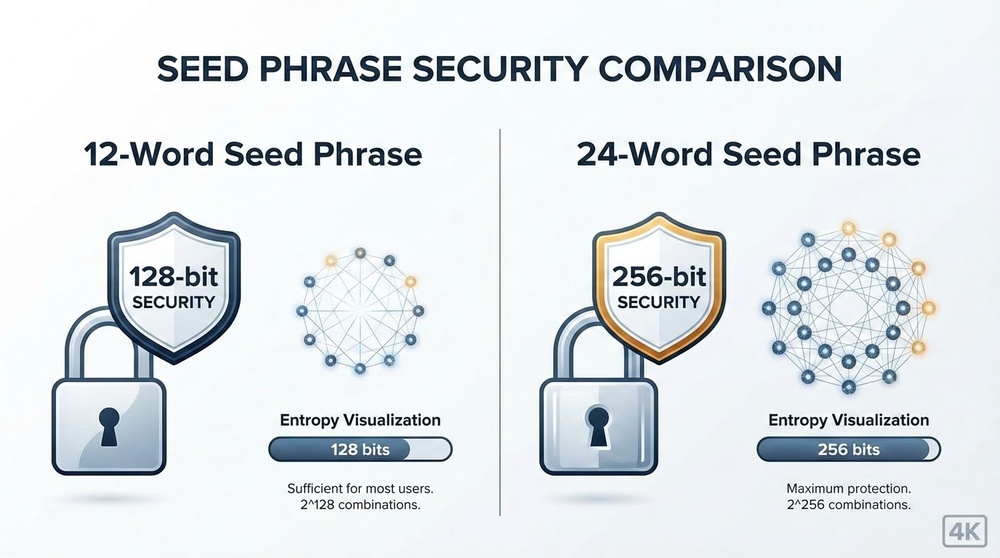
When you create a new wallet, the device generates a random number — entropy. This can be 128 bits (for 12 words) or 256 bits (for 24 words). Think of it as the computer flipping a coin 128 or 256 times and recording the results.
Step 2: Converting to Words (BIP39 Standard)
This random sequence is converted into words from a special BIP39 dictionary containing 2,048 English words. Why words instead of numbers? Because it's easier for humans to remember "apple banana ocean" than "10101101001010110101".
Step 3: Creating the Master Key
From the seed phrase, a master key is generated through the PBKDF2 cryptographic function — the root of your key tree.
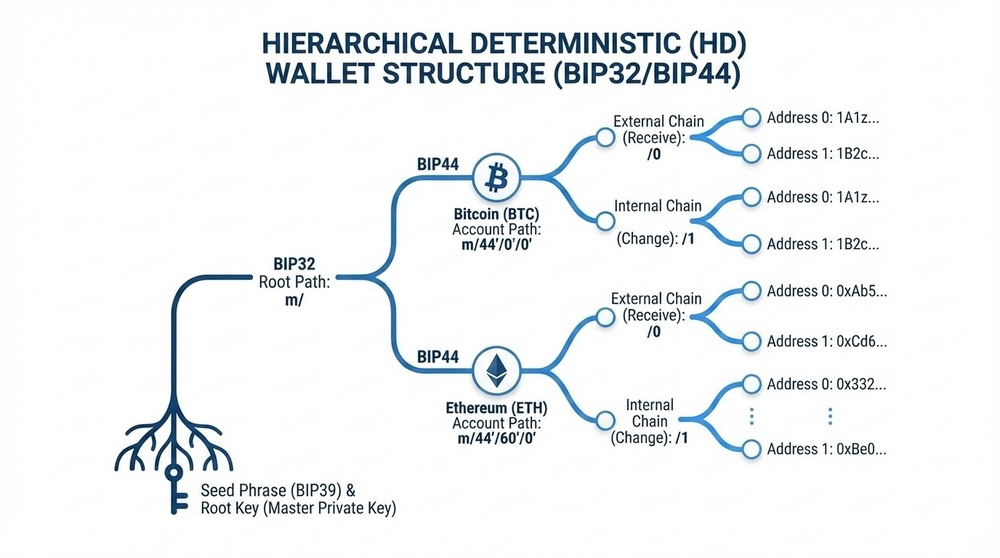
Step 4: Hierarchical Key Tree (HD Wallet)
Following the BIP32/BIP44 standard, billions of different addresses for Bitcoin, Ethereum, and thousands of other cryptocurrencies are mathematically derived from a single master key. All these addresses are controlled by one seed phrase.
Simple Analogy
A seed phrase is like the DNA of your wallet. From one DNA (seed phrase), an entire tree grows with millions of leaves (addresses). Knowing the DNA, you can restore the entire tree. Losing the DNA means losing the tree forever, even if you have a photo of one leaf (one private key).
Types of Seed Phrases: 12, 18, 24 Words — What's the Difference
Modern crypto wallets use different numbers of words in seed phrases. Let's break down which length is suitable for what and why more doesn't always mean better.
12-Word Seed Phrase (128-bit Entropy)
Security Level: 2^128 possible combinations ≈ 340 undecillion variants
Where It's Used:
- MetaMask (default)
- Trust Wallet
- Exodus
- Most mobile wallets
Advantages:
- Easier to write down without errors
- Faster to enter during recovery
- Takes less space on metal backups
- Secure enough for most users
Disadvantages:
- Theoretically less resistant to future quantum computer attacks (but practically not a problem for the next 20-30 years)
24-Word Seed Phrase (256-bit Entropy)
Security Level: 2^256 possible combinations ≈ 115 quattuorvigintillion variants
Where It's Used:
- Ledger Nano S/X (default)
- Trezor Model T
- Coldcard
- Professional solutions for large amounts
Advantages:
- Maximum cryptographic strength
- Protection against hypothetical quantum computers
- Peace of mind for large portfolios
- Industry standard for institutional investors
Disadvantages:
- Takes longer to write and verify
- Higher risk of making errors when writing
- Requires more storage space
18-Word Seed Phrase (Rare)
Some older wallets used 18 words, but this format has practically fallen out of use. If you have such a phrase, it's likely a very old wallet.
| Parameter | 12 Words | 24 Words |
|---|---|---|
| Entropy | 128 bits | 256 bits |
| Combinations | 2^128 (3.4×10^38) | 2^256 (1.15×10^77) |
| Brute Force Time | Billions of years | Trillions of trillions of years |
| Convenience | High | Medium |
| Recommended For | Up to $100,000 | Over $100,000 |
| Quantum Resistance | Sufficient for 20+ years | Maximum |
Professional Opinion: For most users, 12 words is more than enough. The security difference between 12 and 24 words is purely theoretical — brute-forcing even a 12-word phrase is impossible with existing technology. What matters far more is how you store the phrase, not whether you choose 12 or 24 words.
How to Properly Create a Seed Phrase: Step-by-Step Guide
Creating a seed phrase is a critically important moment. One mistake can cost you all your funds. Follow these rules without exception.
Golden Rules for Creating a Seed Phrase
Rule #1: Generate the Seed Phrase Only on a Trusted Device
- Use only official software from the wallet manufacturer
- For hardware wallets — generate the phrase on the device itself, not on a computer
- Make sure your computer/phone isn't infected with malware
- Disconnect from the internet during creation (for the paranoid)
Rule #2: Never Use a Pre-Made Seed Phrase
- If the hardware wallet box already contains a card with a phrase — it's a SCAM
- Don't use seed phrase "generators" from the internet
- Don't accept phrases from "helpers" in tech support
- The only source of your phrase is your device during initial setup
Rule #3: Write Down Sequentially and Accurately
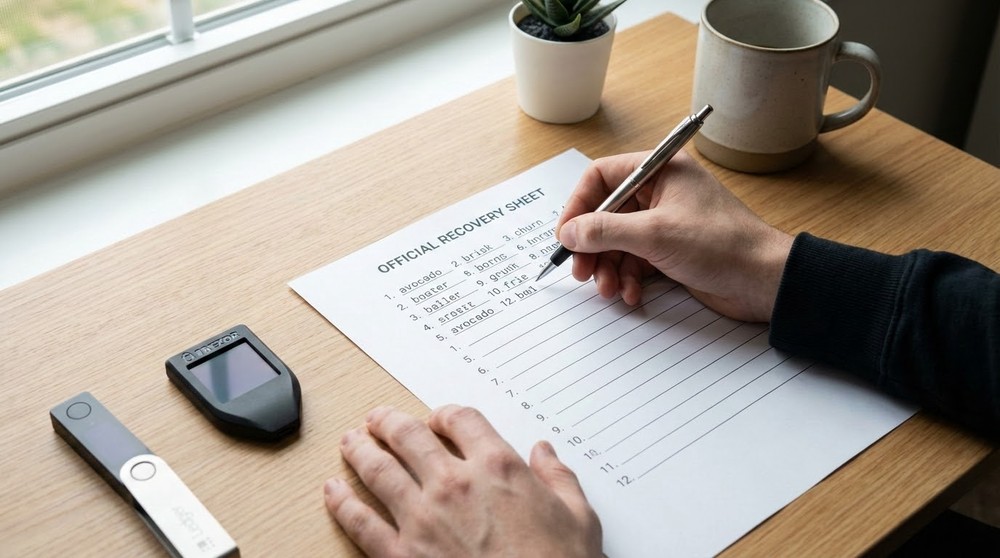
- Use the original recovery sheet from the manufacturer or a clean piece of paper
- Write legibly in block letters
- Number each word (sequence matters)
- Check spelling — "desert" and "dessert" are different words in the BIP39 dictionary
Rule #4: Create at Least 2 Physical Copies
- Primary copy — in a secure location (safe, bank deposit box)
- Backup copy — in a different physical location
- For especially large amounts — 3 copies in different cities
Step-by-Step Process for Creating a Wallet and Recording the Phrase
For Mobile/Desktop Wallets:
- Download the official app — only from the official website or App Store/Google Play
- Select "Create new wallet" — not "Import" or "Restore"
- Prepare pen and paper — before clicking "Next"
- Write down the words in order — usually the app shows them 3-4 words at a time
- Check the spelling of each word — especially similar ones: "world/word", "though/thought"
- Complete the memory test — the app will ask you to select words in the correct order
- DO NOT take a screenshot — never, under any circumstances
- Make a second copy — on another piece of paper
- Hide both copies in different places — don't store them near the device
For Hardware Wallets (Ledger/Trezor):
- Unbox the device — check packaging integrity, holograms
- Connect to computer — install official software (Ledger Live, Trezor Suite)
- Select "Setup as new device"
- Set a PIN code — don't use obvious combinations
- The device will start showing words on screen — one at a time
- Write each word on the recovery sheet — don't skip, don't rush
- The device will verify your knowledge of the phrase — asking you to confirm several words
- Create a second copy — preferably on a metal plate
- Never photograph the phrase — even "temporarily"
Critical Beginner Mistake
Many think: "I'll just quickly snap a photo of the phrase on my phone, then write it down later." You CANNOT do this. Photos automatically sync to the cloud (iCloud, Google Photos), can be compromised if your phone is hacked, and can be recovered even after deletion. One such photo = loss of all funds in case of a leak.
Where and How to Store Your Seed Phrase: Protection Levels
You've written down the phrase. Now the most important question: where to store it? There are several protection levels depending on the amount of assets.
Level 1: Basic Protection (for Capital Up to $5,000)
What to Do:
- Write the phrase on paper in two copies
- Store the primary copy at home in a secure location (not on your desk!)
- Backup copy — with relatives or in another location
- Don't tell anyone about the storage location
Home Storage Locations:
- ✅ In a book on a shelf (not a popular book like "Cryptocurrency for Dummies")
- ✅ In an envelope in a folder with documents (disguised among other papers)
- ✅ In a sealed envelope in a secure drawer
- ❌ Under the mattress (first place thieves look)
- ❌ In your wallet or purse (lose everything if stolen)
- ❌ Near your computer (too obvious)
Level 2: Medium Protection (for Capital $5,000-$50,000)
What to Do:
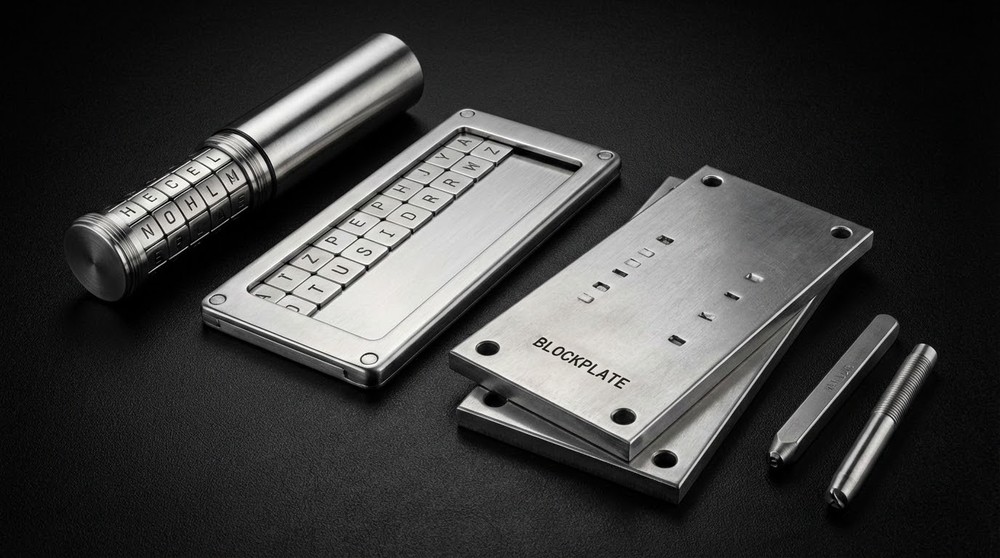
- Metal plate for seed phrase (protection from fire, water, corrosion)
- Home safe with combination lock
- Second copy — in a bank deposit box or with a notary
- Shared responsibility — part of family knows about existence but doesn't have access
Metal Backups:
There are special devices for engraving or stamping seed phrases on metal:
- Cryptosteel Capsule — insert letters into a cylinder, fireproof up to 1400°C
- Billfodl — similar principle, cheaper
- Blockplate — stamp words onto a steel plate with a hammer
- ColdTi — titanium plates with laser engraving
Price: $50 to $200. An investment that pays off with peace of mind for your funds.
Level 3: Maximum Protection (for Capital Over $50,000)
What to Do:
- Use Shamir's Secret Sharing — splitting the phrase into parts
- Multiple metal backups in different locations
- Bank deposit box at a reliable bank
- Passphrase (25th word) — additional protection
- Legal inheritance planning (will with instructions)
Advanced Technique: Shamir Secret Sharing
Trezor Model T supports the SLIP39 standard, allowing you to split your seed phrase into multiple parts (for example, 5 parts where any 3 restore access). Advantages:
- You can lose one part — access is preserved
- One part can be compromised — funds remain safe
- Parts can be stored with different people/in different places
Disadvantage: More complex to use, suitable only for experienced users.
Passphrase (25th Word): Additional Layer of Protection
A passphrase is an optional additional word (or phrase) to your seed phrase. Technically, it creates a completely different wallet with different addresses.
How Passphrase Works
Imagine your 12-word seed phrase is a key to a door. The passphrase is a secret command that opens a hidden door in the wall. Without the passphrase, you enter one wallet; with the passphrase, you enter a completely different one.
Mathematically:
- Seed phrase → Wallet A (regular)
- Seed phrase + Passphrase "MySecret2026" → Wallet B (hidden)
- Seed phrase + Passphrase "DifferentPassword" → Wallet C (another hidden one)
Why Use a Passphrase
Protection from Physical Attack ($5 Wrench Attack)
If someone finds your seed phrase or forces you to reveal it under duress, they only get access to a decoy wallet with a small amount. Your main capital is in the hidden wallet with the passphrase.
Protection from Factory Vulnerabilities
Theoretically, if the random number generator in hardware wallet manufacturing is compromised, the passphrase adds entropy that the attacker doesn't know.
Multiple Wallets from One Phrase
You can create multiple wallets for different purposes: personal, family, business — all with one seed phrase but different passphrases.
How to Properly Use a Passphrase
- Make it sufficiently complex — minimum 8 characters, preferably 12-20
- Don't use dictionary words — "password123" is useless
- Store separately from the seed phrase — otherwise it defeats the purpose
- Memorize or securely record it — recovering a passphrase is impossible
- Test before large amounts — make sure you can restore access
Passphrase Danger
A passphrase is a double-edged sword. If you forget it, you lose access to funds forever, even with the seed phrase. There's no way to recover or guess a passphrase. Use only if you're confident in your memory or have a reliable storage method (for example, in a bank deposit box separate from the seed phrase).
Top 10 Fatal Mistakes When Handling Seed Phrases
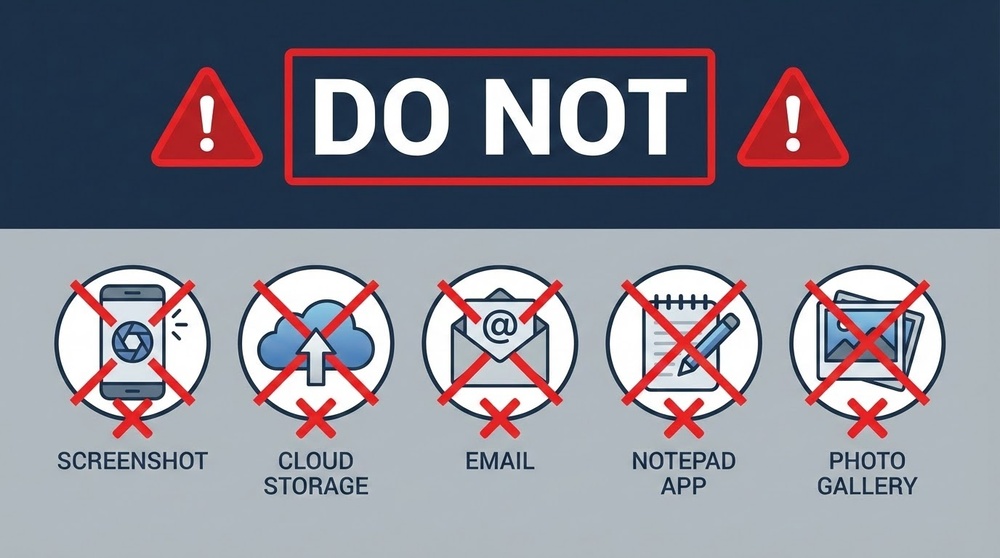
Mistake #1: Storing Digitally
What People Do Wrong: Save seed phrases in:
- Phone notes
- Google Keep, Evernote, Notion
- Email to themselves
- Word/Excel file on computer
- Password manager (even LastPass, 1Password)
- Cloud storage (Dropbox, Google Drive)
Why This Is Catastrophic:
- Cloud services are regularly hacked
- Devices get infected with stealer malware
- Backups sync to unpredictable locations
- Files can be recovered even after deletion
Real Case: In 2019, hackers breached LastPass (password manager) for several users. Those who stored seed phrases there lost all funds within hours.
Mistake #2: Photographing the Seed Phrase
What People Do Wrong: "I'll just quickly snap a photo on my phone so I don't forget, then delete it later."
Why This Is Terrible:
- Photos automatically upload to iCloud/Google Photos
- Cloud services analyze photo content using AI
- Photos remain in "Recently Deleted" for 30 days
- Phone backups contain all photos, including deleted ones
- Repair technicians can copy data when fixing your phone
Correct Approach: Handwritten only. No exceptions.
Mistake #3: Sending the Phrase to Anyone
Typical Situations:
- "My IT friend said he'd help set up my wallet — sent him the phrase on Telegram"
- "Exchange support asked me to send my seed phrase to restore access"
- "Found an 'official MetaMask representative' on Twitter, they asked for the phrase"
Iron Rule: NO ONE, EVER, UNDER ANY CIRCUMSTANCES has the right to ask for your seed phrase. Not support, not friends, not police, not tax authorities. Any request = 100% scam.
Mistake #4: Entering the Phrase on a Fake Website
How the Attack Works:
- Scammers create an exact copy of MetaMask/Trust Wallet/Ledger Live
- They buy Google ads for keywords like "metamask wallet"
- User downloads the fake app
- When "restoring" the wallet, they enter the seed phrase
- The phrase is sent to scammers
- Within minutes, all funds are drained
Protection:
- Bookmark official websites
- Check the URL three times before entering data
- Install apps only from official stores
- Use browser extensions like MetaMask Guard or similar
Mistake #5: Storing Near the Device
Wrote down the phrase and put it in the desk drawer where your Ledger sits — if stolen, you lose everything. Seed phrase and device must be stored separately.
Mistake #6: Not Making a Backup
"I wrote one down, that's enough." Then fire, flood, or simply losing the paper — and that's it, funds are inaccessible forever. Minimum 2 copies in different locations.
Mistake #7: Using Seed Phrase "Generators" from the Internet
Sites like "free seed phrase generator" are created by scammers. All phrases generated there are known to the site creators. As soon as you transfer money there, it's gone.
Mistake #8: Wrong Word Order
Wrote down the words but didn't number them. Then trying to restore and can't remember the sequence. From 12 words, you can create 479,001,600 combinations. Guessing the right one is impossible.
Mistake #9: Typos and Illegible Handwriting
Wrote "dessert" instead of "desert", "though" instead of "through". During recovery, the wallet shows an error. The BIP39 dictionary contains only specific words.
Verification: After writing, go through each word and compare with the official BIP39 list (available on GitHub).
Mistake #10: Not Testing Recovery
Wrote down the phrase, deposited money, and forgot about it. A year later, trying to restore — doesn't work. Turns out you missed a word or wrote in the wrong case.
Correct Approach: Immediately after creating the wallet, delete the app and restore from the seed phrase. Make sure you see the same address. Only then transfer funds.
Advanced Seed Phrase Protection Techniques
Technique #1: Geographic Distribution
Separate the location information from the seed phrase itself:
- Location A (home): First 8 words + information about where the remaining 4 are
- Location B (bank deposit box): Last 4 words + information about the first 8
If one location is compromised, there's no access to funds.
Technique #2: Cryptographic Splitting (for the Paranoid)
Advanced users use the XOR algorithm to split the seed phrase into two parts:
- Part A by itself looks like a valid seed phrase (but leads to an empty wallet)
- Part B — second set of words
- Only the combination A XOR B gives the real phrase
Requires programming and deep understanding of cryptography. Not for beginners.
Technique #3: Mnemonic Encoding
Some users create their own word encoding system that only they understand:
- Write not the word itself, but a hint to it
- Use numerical codes instead of words
- Apply a personal cipher
Risk: Forget the encoding system = lose access. Use only if absolutely confident in your memory.
Technique #4: Multisig for Institutional Amounts
For amounts over a million dollars, consider multisig wallets:
- Create a wallet like 2-of-3 or 3-of-5
- Each seed phrase controls one key
- To transfer funds, you need 2 (or 3) signatures from different devices
- One compromised phrase doesn't give access to funds
Popular solutions: Gnosis Safe, Electrum Multisig, Casa.
What to Do If Your Seed Phrase Is Compromised
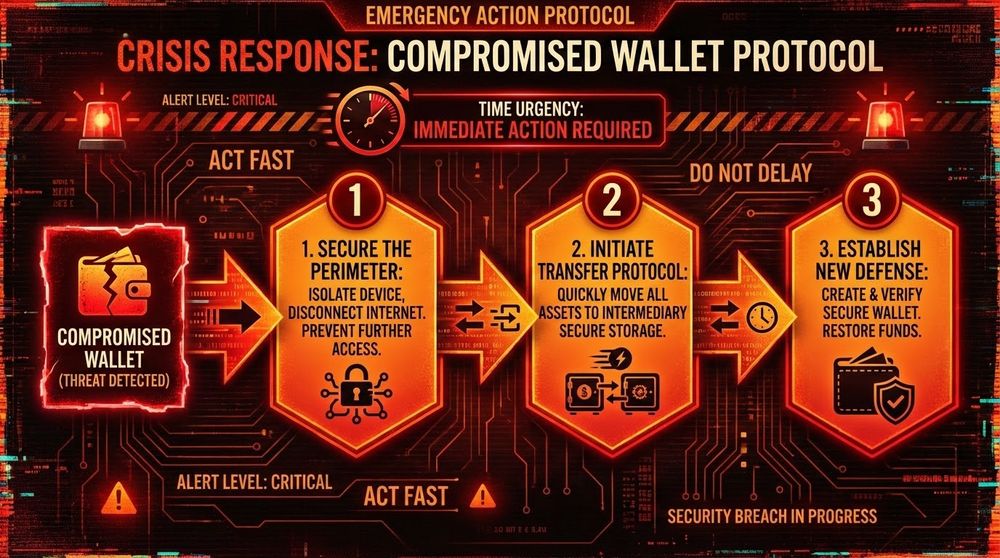
Realized someone might have seen your seed phrase? Act immediately following this protocol.
Action Plan for Compromise
Within 5 Minutes:
- Create a new wallet with a new seed phrase
- Transfer ALL funds to new addresses
- Start with the most valuable assets
- Verify that transactions are confirmed
Within an Hour:
- Transfer remaining tokens and NFTs
- Revoke all approve permissions for old addresses via Revoke.cash
- Check for pending transactions
- Destroy the old seed phrase (burn, tear, shred)
Within a Day:
- Check all services where old addresses were used
- Update addresses for receiving payments
- Change passwords on all related services
- Scan your computer with antivirus
Signs of Possible Compromise
- Found the seed phrase not in its place
- Someone had access to the storage location
- Photographed the phrase (even if you deleted the photo)
- Entered it on a suspicious website
- Someone asked to see the phrase
- Computer was infected with a virus
- Noticed unusual transactions
At the slightest doubt — transfer your funds. Better to spend $10-50 on fees than lose all your capital.
Crypto Asset Inheritance: How to Pass Access to Your Funds
Statistics: 30% of cryptocurrencies are lost forever due to the owner's death without passing access to heirs. Let's solve this problem in advance.
The Crypto Inheritance Problem
Unlike bank accounts, cryptocurrencies don't automatically transfer to heirs. If you're the only one who knows the seed phrase, after your death the funds will remain in the blockchain forever, but no one will be able to use them.
Options for Passing Access
Option 1: Direct Transfer of Phrase to a Trusted Person
Pros: Simple
Cons: The person gets access to funds while you're still alive
Option 2: Sealed Envelope with a Notary
- Write down the seed phrase and instructions
- Seal in an envelope
- Leave with a notary with instructions on who to give it to after death
- Mention the envelope's existence in your will
Option 3: Multisig with Dead Man's Switch
- Create a 2-of-3 multisig wallet
- One key with you
- Two keys with different heirs
- While alive, you control the funds (your key + one heir's by your request)
- After death, heirs can combine their keys
Option 4: Professional Services
- Casa Keymaster — multisig with inheritance option
- Unchained Capital — custody with heir transfer function
- Safe Haven Inheriti — smart contracts for inheritance
Minimum Inheritance Plan
- Create an instruction document for heirs:
- What wallets exist
- Where the seed phrase is stored
- How to restore access
- Crypto lawyer contacts (optional)
- Store instructions separately from the seed phrase
- Mention crypto assets in your will
- Explain basic concepts to a trusted person in advance
- Periodically update information (new wallets, relocations)
Restoring a Wallet from Seed Phrase: Step-by-Step Guide
Lost your device? Got a new phone? Reinstalled the wallet? Here's how to restore access.
Restoring a Mobile/Desktop Wallet
- Download the same wallet you originally used (MetaMask, Trust Wallet, Exodus)
- Select "Import wallet" or "Restore"
- Enter the seed phrase in the correct order
- If set, enter the passphrase
- The wallet will automatically find your addresses
- Check the balance — all funds should appear
Important: Some wallets use different derivation paths (BIP44, BIP49, BIP84). If you don't see funds, try the "Advanced" option and select a different derivation path.
Restoring a Hardware Wallet
- Connect the new device (or one reset to factory settings)
- Select "Restore from recovery phrase"
- Choose the number of words (12 or 24)
- Enter each word — the device will offer autocomplete
- Confirm the phrase
- Set a new PIN
- Connect to Ledger Live/Trezor Suite
- Sync accounts — the device will find all addresses with balances
Recovery Problems and Solutions
"Invalid recovery phrase"
- Check word order
- Verify each word is correct (desert vs dessert)
- Make sure the word count matches (12 vs 24)
- Try entering through a different wallet/device
"Wallet restored but balance is zero"
- A passphrase may have been used — try without it or remember the correct one
- Check derivation path — especially relevant for Bitcoin (Legacy, SegWit, Native SegWit)
- Make sure you're connected to the right network (Mainnet, not Testnet)
- Give it time to sync — sometimes takes 10-30 minutes
"Can't remember one word"
- There's specialized software for brute forcing (BTCrecover, Seedrecover)
- If you remember 11 of 12 words — theoretically possible to guess (2,048 variants)
- If you remember fewer — chances are negligible
- Contact professional recovery services (they take 10-20% of the amount upon success)
Seed Phrase Security Checklist
Go through this list right now and make sure you're protected:
- Seed phrase is written on paper — not on phone, not on computer
- Words are numbered — order is critically important
- Spelling verified — each word from the BIP39 dictionary
- At least 2 copies created — stored in different locations
- For amounts over $5K — metal backup
- Phrase is NOT stored near the device
- No one photographed the phrase
- Phrase was not sent to anyone — even "IT friend"
- Not entered on suspicious websites
- Recovery tested — before transferring large amounts
- Inheritance plan exists — loved ones know about the assets
- For capital over $50K — passphrase considered
Conclusion: Seed Phrase Is Your Financial Sovereignty
A seed phrase isn't just a set of words. It's the embodiment of the principle "Be your own bank". Complete control over your money, independence from governments, banks, and corporations.
But with great freedom comes great responsibility. No one will return what's stolen. No one will restore what's forgotten. No one will compensate for losses from your own negligence.
Treat your seed phrase like keys to a vault with a million dollars — even if there's only a hundred there now. The habit of security must be formed from day one, not when your capital grows.
Remember: In traditional finance, a bad password can be reset. A lost card can be reissued. An account hack can be disputed. In cryptocurrency, a lost seed phrase = lost money. Forever. No recovery options. This isn't a bug — it's a feature of decentralization.
In the next lesson, we'll cover phishing and fake websites — one of the main threats that exploit the human factor to steal seed phrases. We'll learn to spot scam schemes from a mile away.